go.mondoo.com/cnquery@v0.0.0-20231005093811-59568235f6ea/README.md (about) 1 # cnquery 2 3  4  5 6 **Open source, cloud-native asset inventory and discovery** 7 8 cnquery is a cloud-native tool for querying your entire fleet. It answers thousands of questions about your infrastructure and integrates with over 300 resources across cloud accounts, Kubernetes, containers, services, VMs, APIs, and more. 9 10 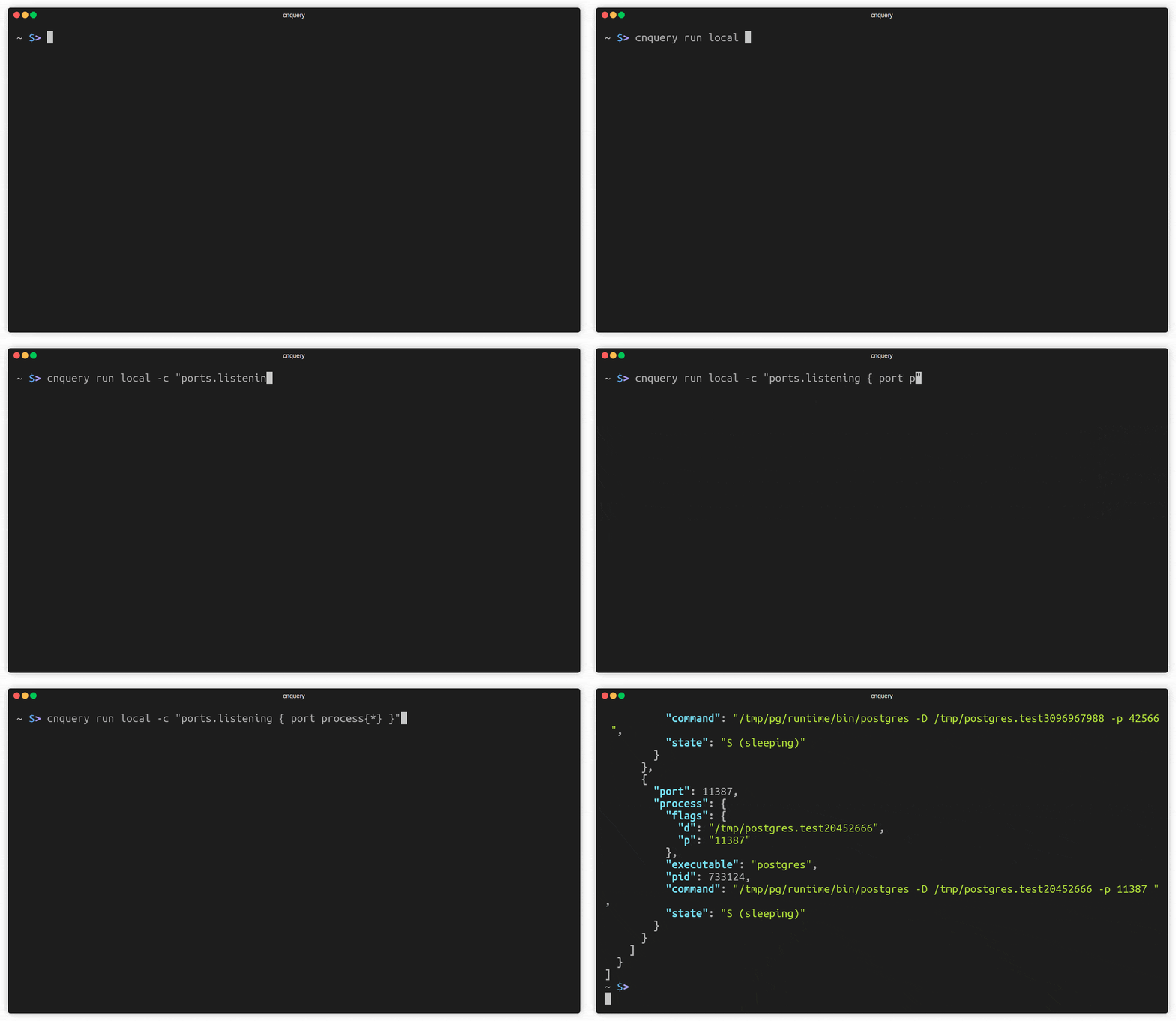 11 12 Here are a few more examples: 13 14 ```bash 15 # run a query and print the output 16 cnquery run -c "ports.listening { port process }" 17 18 # execute a query pack on a Docker image and print results as json 19 cnquery scan docker 14119a -f pack.mql.yaml -j 20 21 # open an interactive shell to an aws account 22 cnquery shell aws 23 > aws.ec2.instances{*} 24 ``` 25 26 [:books: To learn more, read the cnquery docs.](https://mondoo.com/docs/cnquery/home) 27 28 ## Installation 29 30 Install cnquery with our installation script: 31 32 **Linux and macOS** 33 34 ```bash 35 bash -c "$(curl -sSL https://install.mondoo.com/sh)" 36 ``` 37 38 **Windows** 39 40 ```powershell 41 Set-ExecutionPolicy Unrestricted -Scope Process -Force; 42 [System.Net.ServicePointManager]::SecurityProtocol = [System.Net.ServicePointManager]::SecurityProtocol -bor 3072; 43 iex ((New-Object System.Net.WebClient).DownloadString('https://install.mondoo.com/ps1')); 44 Install-Mondoo; 45 ``` 46 47 If you prefer manual installation, you can find the cnquery packages in our [GitHub releases](https://github.com/mondoohq/cnquery/releases). 48 49 ## Interactive shell 50 51 The easiest way to explore cnquery is to use our interactive shell, which has auto-complete to guide you: 52 53 ```bash 54 cnquery shell 55 ``` 56 57 Once inside the shell, you can enter MQL queries like this: 58 59 ```coffeescript 60 > asset { name title } 61 ``` 62 63 To learn more, use the `help` command. 64 65 To exit, either press CTRL + D or type `exit`. 66 67 You can run the shell against local and remote targets like `k8s`, `aws`, `docker`, and many more. Run `--help` to see a full list of supported providers. 68 69 ## Run simple queries 70 71 To run standalone queries in your shell, use the `run` command: 72 73 ```bash 74 cnquery run <TARGET> -c <QUERY> 75 ``` 76 77 For example, this runs a query against your local system: 78 79 ```bash 80 cnquery run -c "services { name running }" 81 ``` 82 83 For automation, it is often helpful to convert the output to JSON. Use `-j` or `--json`: 84 85 ```bash 86 cnquery run local -c "services { * }" -j 87 ``` 88 89 You can then pipe the output to [jq](https://stedolan.github.io/jq/) or other applications. 90 91 ## Query packs 92 93 You can combine multiple queries into query packs, which can run together. cnquery comes with default [query packs](https://github.com/mondoohq/cnquery-packs) out of the box for most systems. You can run: 94 95 ```bash 96 cnquery scan 97 ``` 98 99 Without specifying anything else, cnquery tries to find and run the default query pack for the given system. 100 101 You can specify a query pack that you want to run. Use the `--querypack` argument: 102 103 ```bash 104 cnquery scan --querypack incident-response 105 ``` 106 107 You can also choose just one query from a query pack. Specify the query ID with the query pack: 108 109 ```bash 110 cnquery scan --querypack incident-response --query-id sth-01 111 ``` 112 113 Custom query packs let you bundle queries to meet your specific needs. You can find a simple query pack example in `examples/simple.mql.yaml`. To run it: 114 115 ```bash 116 cnquery scan -f examples/example-os.mql.yaml 117 ``` 118 119 Like all other commands, you can specify different providers like `k8s`, `aws`, `docker`, and many more. Run `--help` to see the full list of supported providers. 120 121 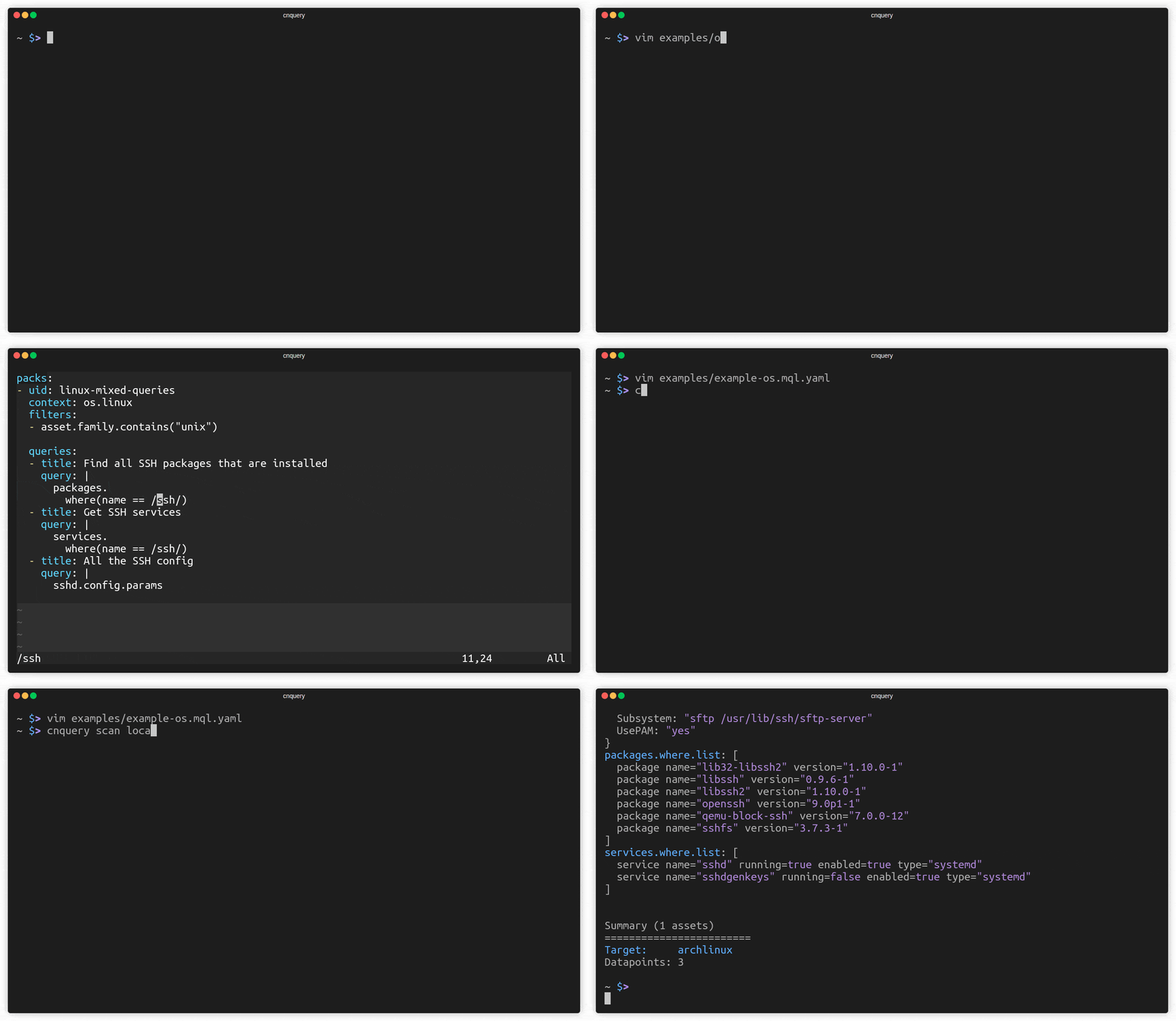 122 123 These files can also contain multiple query packs for many different target systems. 124 125 ## Explore your infrastructure in Mondoo Platform 126 127 To more easily explore your infrastructure, sign up for a free Mondoo Platform account. Mondoo's web-based console allows you to navigate, search, and arrange all of your assets. 128 129 Go to [console.mondoo.com](http://console.mondoo.com) to sign up. 130 131 To learn about Mondoo Platform, read the [Mondoo Platform docs](https://mondoo.com/docs/platform/home/) or visit [mondoo.com](https://www.mondoo.com). 132 133 ## Distribute queries across your fleet with private query packs 134 135 You can create and share query packs using the Registry in the Mondoo Console. The Registry is a secure, private environment in your account where you store both Mondoo query packs and custom query packs. This lets you use the same query packs for all assets. 136 137 To use the Registry: 138 139 ```bash 140 cnquery login --token TOKEN 141 ``` 142 143 Once set up, enable the query packs you want to use to collect your asset's data. For example, you can activate one or more AWS query packs in the Mondoo Console. Then run this command any time to collect the AWS information you need: 144 145 ```bash 146 cnquery scan aws 147 ``` 148 149 To add custom query packs, you can upload them: 150 151 ```bash 152 cnquery bundle upload mypack.mql.yaml 153 ``` 154 155 ## Supported targets 156 157 | Target | Provider | Example | 158 | --------------------------------- | -------------------------- | ------------------------------------------------------------------------------------------------------------------------------------------------------- | 159 | Arista EOS | `arista` | `cnquery shell arista` | 160 | AWS accounts | `aws` | `cnquery shell aws` | 161 | AWS EC2 instances | `ssh` | `cnquery shell ssh user@host` | 162 | AWS EC2 Instance Connect | `aws ec2 instance-connect` | `cnquery shell aws ec2 instance-connect ec2-user@INSTANCEID` | 163 | AWS EC2 EBS snapshot | `aws ec2 ebs snapshot` | `cnquery shell aws ec2 ebs snapshot SNAPSHOTID` | 164 | AWS EC2 EBS volume | `aws ec2 ebs volume` | `cnquery shell aws ec2 ebs volume VOLUMEID` | 165 | Container images | `container`, `docker` | `cnquery shell container ubuntu:latest` | 166 | Container registries | `container registry` | `cnquery shell container registry index.docker.io/library/rockylinux:8 ` | 167 | DNS records | `host` | `cnquery shell host mondoo.com` | 168 | GitHub organizations | `github org` | `cnquery shell github org mondoohq` | 169 | GitHub repositories | `github repo` | `cnquery shell github repo mondoohq/cnquery` | 170 | GitLab groups | `gitlab` | `cnquery shell gitlab --group mondoohq` | 171 | Google Cloud projects | `gcp` | `cnquery shell gcp` | 172 | Google Workspace | `google-workspace` | `cnquery shell google-workspace --customer-id CUSTOMER_ID --impersonated-user-email EMAIL --credentials-path JSON_FILE` | 173 | Kubernetes cluster nodes | `local`, `ssh` | `cnquery shell ssh user@host` | 174 | Kubernetes clusters | `k8s` | `cnquery shell k8s` | 175 | Kubernetes manifests | `k8s` | `cnquery shell k8s manifest.yaml` | 176 | Kubernetes workloads | `k8s` | `cnquery shell k8s --discover pods,deployments` | 177 | Linux hosts | `local`, `ssh` | `cnquery shell local` or<br></br>`cnquery shell ssh user@host` | 178 | macOS hosts | `local`, `ssh` | `cnquery shell local` or<br></br>`cnquery shell ssh user@IP_ADDRESS` | 179 | Microsoft 365 tenants | `ms365` | `cnquery shell ms365 --tenant-id TENANT_ID --client-id CLIENT_ID --certificate-path PFX_FILE` | 180 | Microsoft Azure subscriptions | `azure` | `cnquery shell azure --subscription SUBSCRIPTION_ID` | 181 | Microsoft Azure instances | `ssh` | `cnquery shell ssh user@host` | 182 | Okta | `okta` | `cnquery shell okta --token TOKEN --organization ORGANIZATION` | 183 | OPC UA | `opcua` | `cnquery shell opcua` | 184 | Oracle Cloud Infrastructure (OCI) | `oci` | `cnquery shell oci` | 185 | Running containers | `docker` | `cnquery shell docker CONTAINER_ID` | 186 | Slack | `slack` | `cnquery shell slack --token TOKEN` | 187 | SSL certificates on websites | `host` | `cnquery shell host mondoo.com` | 188 | Terraform HCL | `terraform hcl` | `cnquery shell terraform <directory> HCL_FILE_OR_PATH` | 189 | Terraform plan | `terraform plan` | `cnquery shell terraform plan <plan.json> json` | 190 | Terraform state | `terraform state` | `cnquery shell terraform state <state_file>.json` | 191 | Vagrant virtual machines | `vagrant` | `cnquery shell vagrant HOST` | 192 | VMware vSphere | `vsphere` | `cnquery shell vsphere user@domain@host --ask-pass` | 193 | Windows hosts | `local`, `ssh`, `winrm` | `cnquery shell local`<br></br>`cnquery shell ssh Administrator@IP_ADDRESS --ask-pass`<br></br>`cnquery shell winrm Administrator@IP_ADDRESS --ask-pass` | 194 195 ## What's next? 196 197 There are so many things cnquery can do! Gather information about your fleet, find tool-sprawl across systems, run incident response, and share data with auditors… cnquery is nearly limitless in capabilities. 198 199 Explore: 200 201 - [cnquery docs](https://mondoo.com/docs/cnquery/home) 202 - [Query packs](https://github.com/mondoohq/cnquery-packs) 203 - [MQL introduction](https://mondoohq.github.io/mql-intro/index.html) 204 - [MQL language reference](https://mondoo.com/docs/mql/resources/) 205 - [cnspec](https://github.com/mondoohq/cnspec), our open source, cloud-native security scanner 206 207 ## Join the community! 208 209 Our goal is to become the API for your entire infrastructure. Join our [community](https://github.com/orgs/mondoohq/discussions) today and let's grow it together! 210 211 ## Development 212 213 See our [development documentation](docs/development.md) for information on building and contributing to cnquery. 214 215 ## Legal 216 217 - **Copyright:** 2018-2023, Mondoo, Inc. 218 - **License:** BUSL 1.1 219 - **Authors:** Christoph Hartmann, Dominik Richter