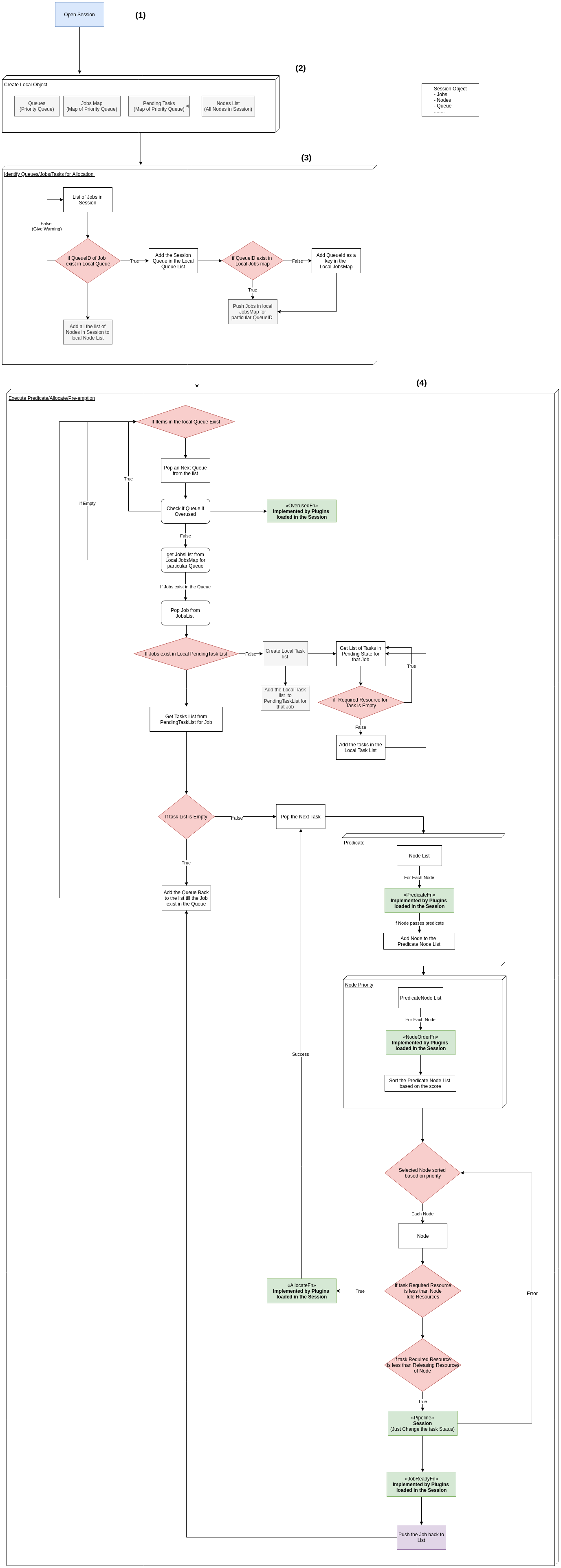
volcano.sh/volcano@v1.9.0/docs/design/execution-flow.md (about) 1 ## Execution of the Scheduler for Allocating the Workloads to Node 2 3 The Allocation of the workloads to the node in scheduler happens in each session and the workflow of the session is illustrated in the below diagram. 4 5 1. Session Opens every 1 sec 6 2. In every session local copies of Queues, JobsMap, PendingTasks and Node List is created. 7 3. For Each Jobs in the Session 8 1. If the Queued ID in the Job exists in the Local Copy of Queues then : 9 1. Add the Queue in the Local Copy of Queues 10 1. If the QueueID exists in local copyof JobsMap: 11 1. Push the Job in the JobsMap 12 2. If Not then Add the QueueID as the key in Local JobsMap and add the job in the Map. 13 2. If Not then Give warning and continue to Step 3 14 4. For Each Item in Local Queues 15 1. Pop an Queue from the Queues 16 1. Check if Queue is overused 17 1. If Yes then Continue to Step 4 18 2. If Not then get the list of JobsList from the JobsMap for the particular Queue. 19 1. If List is empty then continue to Step 4 20 2. If Yes then Pop a Job from the JobsList 21 1. If Job exits the Local PendingTasks 22 1. If Not then : 23 1. Create a Local Task List 24 1. Get the List of Each Tasks in the pending state for that job 25 1. If the required resource for the job is Empty then go back to previous step 26 2. If Not then Add the tasks in the Local TasksList 27 2. Add the local Tasks List to PendingTasks for that Job 28 2. If Yes then : 29 1. For each Tasks from the pendingTasksList for the Job. 30 1. Pop the tasks 31 2. Get the list of predicate nodes for the task. 32 3. Score the predicate nodes and sort it. 33 4. For each node in the sorted predicated + scored nodes 34 1. If the Resource required by task is less than Idle resource of Nodes 35 1. If Resource required by task is less than releasing resource of Node 36 1. Then Add the tasks in Pipeline 37 3. Check if Job is ready to be allocated 38 1. If yes the push the Job 39 2. If No then add the Queue back to the list. 40 3. Continue till all the Job is ready 41 2. Continue till each Queue is processed. 42 43 44 45 46 47 48