volcano.sh/volcano@v1.9.0/docs/user-guide/how_to_use_gpu_sharing.md (about) 1 # GPU Sharing User guide 2 3 ## Environment setup 4 5 ### Install volcano 6 7 #### 1. Install from source 8 9 Refer to [Install Guide](../../installer/README.md) to install volcano. 10 11 > **Note** The Volcano VGPU feature has been transferred to the HAMI project, click [here](https://github.com/Project-HAMi/volcano-vgpu-device-plugin) to access 12 13 After installed, update the scheduler configuration: 14 15 ```shell script 16 kubectl edit cm -n volcano-system volcano-scheduler-configmap 17 ``` 18 19 For volcano v1.8.2+(v1.8.2 excluded), use the following configMap 20 21 ```yaml 22 kind: ConfigMap 23 apiVersion: v1 24 metadata: 25 name: volcano-scheduler-configmap 26 namespace: volcano-system 27 data: 28 volcano-scheduler.conf: | 29 actions: "enqueue, allocate, backfill" 30 tiers: 31 - plugins: 32 - name: priority 33 - name: gang 34 - name: conformance 35 - plugins: 36 - name: drf 37 - name: deviceshare 38 arguments: 39 deviceshare.GPUSharingEnable: true # enable gpu sharing 40 - name: predicates 41 - name: proportion 42 - name: nodeorder 43 - name: binpack 44 ``` 45 46 For volcano v1.8.2-(v1.8.2 included), use the following configMap 47 48 ```yaml 49 kind: ConfigMap 50 apiVersion: v1 51 metadata: 52 name: volcano-scheduler-configmap 53 namespace: volcano-system 54 data: 55 volcano-scheduler.conf: | 56 actions: "enqueue, allocate, backfill" 57 tiers: 58 - plugins: 59 - name: priority 60 - name: gang 61 - name: conformance 62 - plugins: 63 - name: drf 64 - name: predicates 65 arguments: 66 predicate.GPUSharingEnable: true # enable gpu sharing 67 - name: proportion 68 - name: nodeorder 69 - name: binpack 70 ``` 71 72 #### 2. Install from release package 73 74 Same as above, after installed, update the scheduler configuration in `volcano-scheduler-configmap` configmap. 75 76 ### Install Volcano device plugin 77 78 Please refer to [volcano device plugin](https://github.com/volcano-sh/devices/blob/master/README.md#quick-start) 79 80 * By default volcano device plugin supports shared GPUs, users do not need to config volcano device plugin. Default setting is the same as setting --gpu-strategy=share. For more information [volcano device plugin configuration](https://github.com/volcano-sh/devices/blob/master/doc/config.md) 81 82 ### Verify environment is ready 83 84 Check the node status, it is ok if `volcano.sh/gpu-memory` and `volcano.sh/gpu-number` are included in the allocatable resources. 85 86 ```shell script 87 $ kubectl get node {node name} -oyaml 88 ... 89 status: 90 addresses: 91 - address: 172.17.0.3 92 type: InternalIP 93 - address: volcano-control-plane 94 type: Hostname 95 allocatable: 96 cpu: "4" 97 ephemeral-storage: 123722704Ki 98 hugepages-1Gi: "0" 99 hugepages-2Mi: "0" 100 memory: 8174332Ki 101 pods: "110" 102 volcano.sh/gpu-memory: "89424" 103 volcano.sh/gpu-number: "8" # GPU resource 104 capacity: 105 cpu: "4" 106 ephemeral-storage: 123722704Ki 107 hugepages-1Gi: "0" 108 hugepages-2Mi: "0" 109 memory: 8174332Ki 110 pods: "110" 111 volcano.sh/gpu-memory: "89424" 112 volcano.sh/gpu-number: "8" # GPU resource 113 ``` 114 115 ### Running GPU Sharing Jobs 116 117 NVIDIA GPUs can now be shared via container level resource requirements using the resource name `volcano.sh/gpu-memory`: 118 119 ```shell script 120 $ cat <<EOF | kubectl apply -f - 121 apiVersion: v1 122 kind: Pod 123 metadata: 124 name: gpu-pod1 125 spec: 126 schedulerName: volcano 127 containers: 128 - name: cuda-container 129 image: nvidia/cuda:9.0-devel 130 command: ["sleep"] 131 args: ["100000"] 132 resources: 133 limits: 134 volcano.sh/gpu-memory: 1024 # requesting 1024MB GPU memory 135 EOF 136 137 $ cat <<EOF | kubectl apply -f - 138 apiVersion: v1 139 kind: Pod 140 metadata: 141 name: gpu-pod2 142 spec: 143 schedulerName: volcano 144 containers: 145 - name: cuda-container 146 image: nvidia/cuda:9.0-devel 147 command: ["sleep"] 148 args: ["100000"] 149 resources: 150 limits: 151 volcano.sh/gpu-memory: 1024 # requesting 1024MB GPU memory 152 EOF 153 ``` 154 155 If only the above pods are claiming gpu resource in a cluster, you can see the pods sharing one gpu card: 156 157 ```shell script 158 $ kubectl exec -ti gpu-pod1 env 159 ... 160 VOLCANO_GPU_MEMORY_TOTAL=11178 161 VOLCANO_GPU_ALLOCATED=1024 162 NVIDIA_VISIBLE_DEVICES=0 163 ... 164 165 $ kubectl exec -ti gpu-pod1 env 166 ... 167 VOLCANO_GPU_MEMORY_TOTAL=11178 168 VOLCANO_GPU_ALLOCATED=1024 169 NVIDIA_VISIBLE_DEVICES=0 170 ... 171 ``` 172 173 ### Understanding how GPU sharing works 174 175 The GPU sharing workflow is depicted as below: 176 177 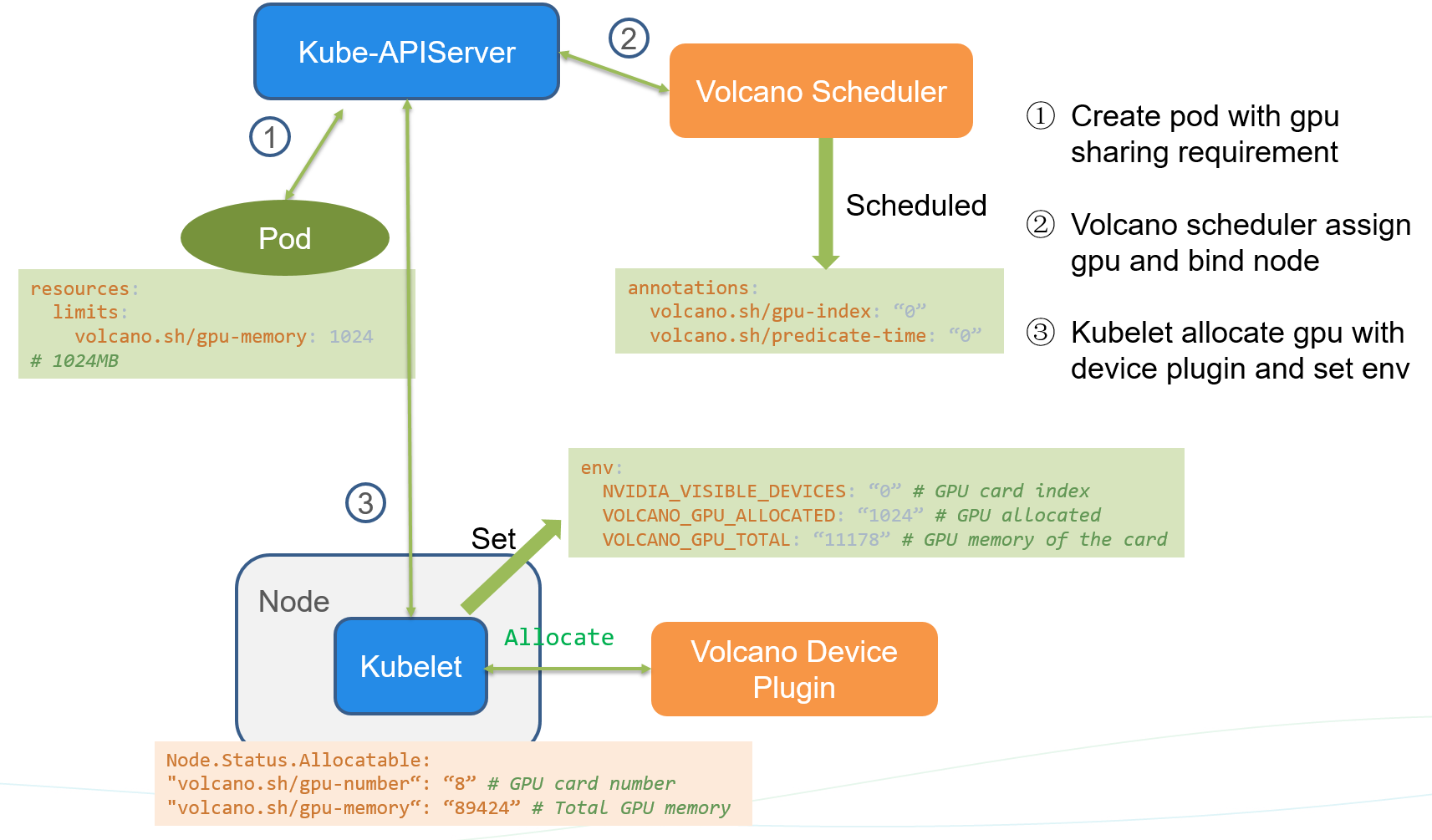 178 179 1. create a pod with `volcano.sh/gpu-memory` resource request, 180 181 2. volcano scheduler predicates and allocate gpu resource for the pod. Adding the below annotation 182 183 ```yaml 184 annotations: 185 volcano.sh/gpu-index: "0" 186 volcano.sh/predicate-time: "1593764466550835304" 187 ``` 188 189 3. kubelet watches the pod bound to itself, and call allocate API to set env before running the container. 190 191 ```yaml 192 env: 193 NVIDIA_VISIBLE_DEVICES: "0" # GPU card index 194 VOLCANO_GPU_ALLOCATED: "1024" # GPU allocated 195 VOLCANO_GPU_MEMORY_TOTAL: "11178" # GPU memory of the card 196 ```