github.com/google/syzkaller@v0.0.0-20251211124644-a066d2bc4b02/docs/internals.md (about) 1 # How syzkaller works 2 3 Generic description of how syzkaller works are [below](internals.md#overview). 4 5 Linux kernel specific internals can be found [here](linux/internals.md). 6 7 ## Overview 8 9 The process structure for the syzkaller system is shown in the following diagram; 10 red labels indicate corresponding configuration options. 11 12 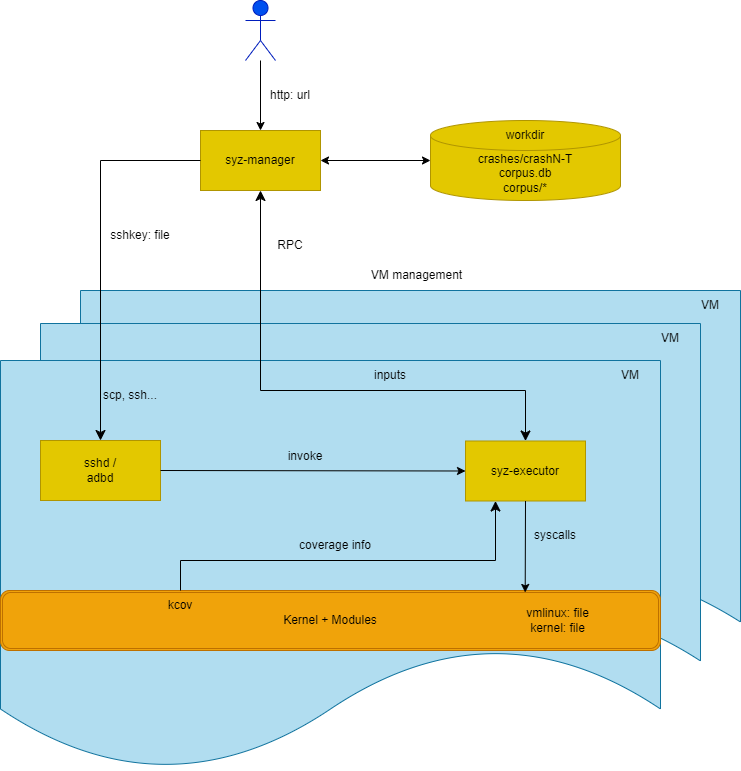 13 14 `syz-manager` is responsible for: 15 * Starting/restarting/monitoring VM instances. 16 * The actual fuzzing process (input generation, mutation, minimization, etc.). 17 * Persistent corpus and crash storage. 18 19 It runs on a host with a stable kernel which does not experience white-noise fuzzer load. 20 21 `syz-manager` starts `syz-executor` processes (one inside each VM). 22 `syz-executor`s communicate with `syz-manager` over RPC to receive the programs 23 that must be executed and to report back the results (error statuses, collected coverage, etc.). 24 25 To execute programs, `syz-executor` starts transient subprocesses. 26 27 Each transient subprocess executes a single input (a sequence of syscalls). 28 It is designed to be as simple as possible (to not interfere with fuzzing process), 29 written in C++, compiled as static binary and uses shared memory for communication. 30 31 ## Syscall descriptions 32 33 The `syz-manager` process generates programs based on syscall descriptions described [here](syscall_descriptions.md). 34 35 ## Coverage 36 37 Syzkaller is a coverage-guided fuzzer. The details about coverage collection can be found [here](coverage.md). 38 39 ## Crash reports 40 41 When `syzkaller` finds a crasher, it saves information about it into `workdir/crashes` directory. 42 The directory contains one subdirectory per unique crash type. 43 Each subdirectory contains a `description` file with a unique string identifying the crash (intended for bug identification and deduplication); 44 and up to 100 `logN` and `reportN` files, one pair per test machine crash: 45 ``` 46 - crashes/ 47 - 6e512290efa36515a7a27e53623304d20d1c3e 48 - description 49 - log0 50 - report0 51 - log1 52 - report1 53 ... 54 - 77c578906abe311d06227b9dc3bffa4c52676f 55 - description 56 - log0 57 - report0 58 ... 59 ``` 60 61 Descriptions are extracted using a set of [regular expressions](/pkg/report/). 62 This set may need to be extended if you are using a different kernel architecture, or are just seeing a previously unseen kernel error messages. 63 64 `logN` files contain raw `syzkaller` logs and include kernel console output as well as programs executed before the crash. 65 These logs can be fed to `syz-repro` tool for [crash location and minimization](reproducing_crashes.md), 66 or to `syz-execprog` tool for [manual localization](reproducing_crashes.md#from-execution-logs). 67 `reportN` files contain post-processed and symbolized kernel crash reports (e.g. a KASAN report). 68 Normally you need just 1 pair of these files (i.e. `log0` and `report0`), because they all presumably describe the same kernel bug. 69 However, `syzkaller` saves up to 100 of them for the case when the crash is poorly reproducible, or if you just want to look at a set of crash reports to infer some similarities or differences. 70 71 There are 3 special types of crashes: 72 - `no output from test machine`: the test machine produces no output whatsoever 73 - `lost connection to test machine`: the ssh connection to the machine was unexpectedly closed 74 - `test machine is not executing programs`: the machine looks alive, but no test programs were executed for long period of time 75 76 Most likely you won't see `reportN` files for these crashes (e.g. if there is no output from the test machine, there is nothing to put into report). 77 Sometimes these crashes indicate a bug in `syzkaller` itself (especially if you see a Go panic message in the logs). 78 However, frequently they mean a kernel lockup or something similarly bad (here are just a few examples of bugs found this way: 79 [1](https://groups.google.com/d/msg/syzkaller/zfuHHRXL7Zg/Tc5rK8bdCAAJ), 80 [2](https://groups.google.com/d/msg/syzkaller/kY_ml6TCm9A/wDd5fYFXBQAJ), 81 [3](https://groups.google.com/d/msg/syzkaller/OM7CXieBCoY/etzvFPX3AQAJ)).